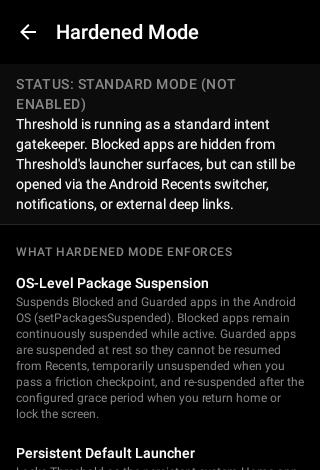
Hardened Mode
In standard mode, Dry Toast is a gentle gatekeeper on your home screen. When you want Android itself to enforce your boundaries, optional Hardened Mode uses Android’s built-in Device Owner capability instead of invasive Accessibility Service screen-scraping.
OS-Level App Suspension
Blocked apps and resting Guarded apps are suspended directly by the Android OS. They cannot be opened from Recent Apps, notifications, deep links, or Play Store shortcuts until your rules allow them. Your default Phone dialer stays permanently exempt.
Guarded Session Leases
When you complete a friction checkpoint for a Guarded app in Hardened Mode, Dry Toast temporarily unsuspends it for a configurable grace period (0–30 minutes) and automatically re-suspends it once the session ends.
Tamper Resistance
Locks Dry Toast as your persistent default home screen and prevents impulse force-stopping, storage clearing, or uninstalling Dry Toast while Hardened Mode is active.
Setup & Removal
Hardened Mode is provisioned via a 6-Tap QR code on a fresh or factory-reset Android phone and can be deactivated cleanly anytime from the Console without wiping your device.