Configuration
Press and hold on the home screen for three seconds (or type :settings in search) to configure your rules, profiles, and triggers.
App Rules (Allow, Guard, Block)
Every installed app sits in one of three states: Allowed (opens normally), Guarded (requires a friction checkpoint first), or Blocked (hidden from your home screen and search). Your default Phone dialer is always allowed.
Profiles & Cascading Rules
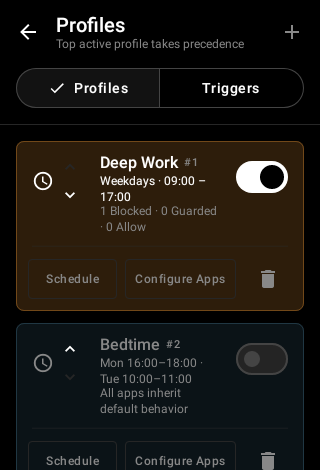
Set your baseline rules once, then create focused profiles such as Work, Evening, or Weekend. Multiple profiles can be active at the same time and are evaluated in priority order: the first active profile that defines a rule for an app takes effect, while any app left unspecified falls through to the next active profile or your base settings. This lets you combine profiles cleanly without duplicating your entire app list.
Schedules, Location & NFC Triggers
Switch profiles automatically on a time schedule, when arriving at a place, or by tapping a physical NFC card on your desk or nightstand.
Settings Lock & Reboot-to-Apply
To prevent weakening your rules on impulse, turn on Require Reboot for Settings Changes so edits only take effect after a restart, or lock Dry Toast Settings completely using the Settings Lock Console.